# Matcher Reference
Matchers are used by [rules](index.md) to specify how to match a single
attribute. In its simplest form a matcher performs
[text equality matching on a single field](#simple-text-equality).
Each matcher needs at least one [transformation output](transformer.md#output).
## Advanced Text Matching
The advanced text matcher uses [tokenization](tokenizer.md) and
[text comparisons](text-comparison.md) to check if the provided
transformation output has a similar value for two records. This is the right
choice when you need fuzzy matching for your texts.
In general the advanced text matcher works by getting different tokens from
the transformation output using the selected output and then comparing the
tokens using the selected token strategy. Each token pair is compared using the
selected text comparison.
By default matching happens only if both values contain a non-empty value.
Disabling the must exist option will also allow matches if both values are empty.
When choosing [no tokenization](tokenizer.md#no-tokenization), then it is not
possible to chose a token strategy and instead the whole text is compared using
the selected text comparison.
A special option is the generally available "index token combinations" option:
it can be used to improve the performance in certain scenarios by ensuring that
for each record a minimum number of tokens will be indexed together. This may
reduce the number of potential matches, but also means that the text must
contain at least that many tokens. It is advisable to use this option
exclusively when there is a clear understanding of its performance implications.
### Indexing
#### Index Strategies
The advanced text matcher supports different index strategies that determine how
tokens are indexed:
- **combinations** (default): Creates an index key for each token or token combination
- **categories**: Categorizes tokens by reference list weights
#### Blocking Strategies
!!!
Blocking strategies are only available when using a [**similarity comparer**](text-comparison.md#text-similarity).
!!!
The advanced text matcher supports two blocking strategies that control how tokens
are indexed and matched:
##### Shingles (Default)
The default blocking strategy uses character n-grams (shingles) to create index keys.
For example, with a shingle size of 3, the token "smith" would create index keys:
`["smi", "mit", "ith"]`. This creates multiple index keys per token.
**Configuration:**
| Option | Type | Default | Description |
| ------ | ---- | ------- | ----------- |
| `blockingStrategy` | string | `"shingles"` | Use `"shingles"` for shingle-based blocking (this is the default) |
| `shingleSize` | int | (comparer default) | Optional override for the shingle size (k-gram size) used in the configured comparer |
##### Variations
The variations blocking strategy reduces the number of indexes created by using
phonetic encoding combined with intelligent variation generation. This approach
is particularly effective for fuzzy matching of names and text with common typos.
**How it works:**
- **During indexing**: The system only indexes the phonetic encoding of the original tokens. This results in fewer index
keys compared to shingle-based indexing.
- **During lookup**: The system generates variations of each query token (e.g., common
typos, plural), applies phonetic encoding to deduplicate similar
variations, finds the matching blocks in the index, then compares the
original values using the configured similarity comparer.
**Configuration:**
When using `blockingStrategy: "variations"`, you can configure the following options:
| Option | Type | Default | Description |
| ------ | ---- | ------- | ----------- |
| `blockingStrategy` | string | `"shingles"` | Set to `"variations"` to enable variation-based blocking |
| `variationsPhoneticAlgs` | string[] | `["cologne"]` | Phonetic algorithms to use: `cologne`, `soundex`, or `metaphone` |
| `variationMaxConsonantDeletions` | int | `10` | Maximum consonant deletion variations (e.g., "Schmidt" → "Schmit"). Use `0` to disable, `-1` for unlimited |
| `variationMaxConsonantSubstitutions` | int | `10` | Maximum consonant substitution variations (e.g., "Schmidt" → "Schmitt"). Use `0` to disable, `-1` for unlimited |
| `variationMaxBigramTranspositions` | int | `0` | Maximum bigram transposition variations (e.g., "Simth" → "Smith"). Disabled by default |
| `variationMaxEndingVariations` | int | `5` | Maximum ending variation additions/removals (e.g., "Müller" → "Mueller"). Use `0` to disable, `-1` for unlimited |
| `variationMaxKeyboardTypos` | int | `0` | Maximum keyboard typo variations (e.g., "Smith" → "Smuth"). Disabled by default |
| `variationEnablePluralSingular` | bool | `true` | Enable plural/singular variations (e.g., "person" ↔ "persons") |
**Example Configuration:**
```json
{
"comparerID": "similarity",
"blockingStrategy": "variations",
"variationsPhoneticAlgs": ["cologne", "soundex"],
"variationMaxConsonantDeletions": 5,
"variationMaxConsonantSubstitutions": 5,
"variationMaxBigramTranspositions": 1,
"variationMaxEndingVariations": 3,
"variationMaxKeyboardTypos": 1,
"variationEnablePluralSingular": true
}
```
!!!warning
Generating too many variations can impact look up performance.
Start with conservative limits and adjust based on your
specific use case and performance requirements.
!!!
### Matching
The following token strategies are available. All given examples use word based
tokenization and exact matching for simplicity.
#### Minimum Matches
Minimum matches compares all tokens from text 1 with all tokens from text 2 and
is satisfied if at least the minimum number of token matches is reached. The
order of the tokens does not matter.
##### Examples
* Minimum Token Matches: 2
| Text 1 | Text 2 | Matches |
| --------------- | -------------- | ------- |
| John | John | false |
| John Smith | John Smith | true |
| John Smith | Smith John | true |
| John Smith | John Doe | false |
| John Smith | John Smith-Doe | true |
| John Smith | Smith John Doe | true |
| John John | John Smith | true |
| John Smith-Doe | John Smith-Doe | true |
| John Smith Doe | Smith John Doe | true |
| John John Smith | John Smith-Doe | true |
| Jane Smith-Doe | John Smith-Doe | true |
* Minimum Token Matches: 3
| Text 1 | Text 2 | Matches |
| --------------- | -------------- | ------- |
| John | John | false |
| John Smith | John Smith | false |
| John Smith | Smith John | false |
| John Smith | John Doe | false |
| John Smith | John Smith-Doe | false |
| John Smith | Smith John Doe | false |
| John John | John Smith | false |
| John Smith-Doe | John Smith-Doe | true |
| John Smith Doe | Smith John Doe | true |
| John John Smith | John Smith-Doe | true |
| Jane Smith-Doe | John Smith-Doe | false |
#### Same Token Order
Same token order expects both texts to have the same amount of tokens and then
compares the first token from text 1 with the first from text 2, the second from
text 1 with the second from text 2, and so on. Hence, the order of the tokens
matters, but there is no minimum amount of tokens required.
##### Examples
| Text 1 | Text 2 | Matches |
| ---------- | -------------- | ------- |
| John | John | true |
| John Smith | John Smith | true |
| John Smith | Smith John | false |
| John Smith | John Doe | false |
| John Smith | John Smith-Doe | false |
| John Smith | Smith John Doe | false |
| John John | John Smith | false |
#### Token Overlap
The token overlap matches if there is a certain overlap between the tokens of
both texts. It works by comparing all tokens from text 1 with all tokens from
text 2 and figures out the combination in which the least amount of additional
(unmatched) tokens exist. It is satisfied if the amount of additional tokens is
equal to or lower than the configured maximum additional tokens.
This strategy works in two different modes. Either one of the two texts must be
fully included in the other text (one of the texts must have no additional
tokens) or both texts may have additional tokens, but share at least one token.
Optionally you can remove identical tokens before processing by enabling the
corresponding checkbox.
Due to the complexity of this specific strategy it will only work for for a
maximum of 8 tokens (default: 6).
##### Examples
* Mode: One input must be completely included in the other one
* Maximum Additional Tokens: 2
* Maximum Processable Tokens: 5
* Remove Duplicate Tokens: disabled
| Text 1 | Text 2 | Additional Tokens | Matches |
| ----------------------------- | ----------------------------- | ----------------- | ------- |
| John | John | 0 | true |
| John Smith | John Smith | 0 | true |
| John Smith | Smith John | 0 | true |
| John Smith | John Doe | 2 | false |
| John Smith | John Smith-Doe | 1 | true |
| John Smith | Smith John Doe | 1 | true |
| John John | John Smith | 2 | false |
| John Smith | John Jim Smith-Doe | 2 | true |
| John Smith | John Jim Jane Smith-Doe | 3 | false |
| John Jim Jane Julia Smith-Doe | John Jim Jane Julia Smith-Doe | n/a* | false |
* Mode: One input must be completely included in the other one
* Maximum Additional Tokens: 2
* Maximum Processable Tokens: 5
* Remove Duplicate Tokens: enabled
| Text 1 | Text 2 | Additional Tokens | Matches |
| --------- | ---------- | ----------------- | ------- |
| John John | John Smith | 1 | true |
* Mode: At least one token between the inputs must be similar
* Maximum Additional Tokens: 2
* Maximum Processable Tokens: 5
* Remove Duplicate Tokens: disabled
| Text 1 | Text 2 | Additional Tokens | Matches |
| ----------------------------- | ----------------------------- | ----------------- | ------- |
| John | John | 0 | true |
| John Smith | John Smith | 0 | true |
| John Smith | Smith John | 0 | true |
| John Smith | John Doe | 2 | true |
| John Smith | John Smith-Doe | 1 | true |
| John Smith | Smith John Doe | 1 | true |
| John John | John Smith | 2 | true |
| John Smith | John Jim Smith-Doe | 2 | true |
| John Smith | John Jim Jane Smith-Doe | 3 | false |
| John Jim Jane Julia Smith-Doe | John Jim Jane Julia Smith-Doe | n/a* | false |
(*) not matched due to too many tokens
#### Token Ratio
Token ratio compares all tokens from text 1 with all tokens from text 2 and
calculates a ratio of matching tokens. If the ratio is equal to or higher than
the configured ratio, then the matcher is satisfied.
The ratio is calculated as ${\displaystyle {r = {\frac {t_m}{t_u}}}}$, where $t_m$
is the number of matching tokens and $t_u$ is the total number of unique tokens.
##### Examples
| Text 1 | Text 2 | Ratio |
| ---------- | -------------- | ---------------- |
| John | John | $1.0$ |
| John Smith | John Smith | $1.0$ |
| John Smith | Smith John | $1.0$ |
| John Smith | John Doe | $0.\overline{3}$ |
| John Smith | John Smith-Doe | $0.\overline{6}$ |
| John Smith | Smith John Doe | $0.\overline{6}$ |
| John John | John Smith | $0.5$ |
##### Example with Other Text Comparison
Be aware that the the required uniqueness of tokens might change the results
when working with non-equal text comparisons.
* Compare Tokens Using: Phonetic (Soundex)
| Text 1 | Text 2 | Ratio |
| ---------- | ----------- | ---------------- |
| John Smith | John Smith | $1.0$ |
| John Smith | Johnn Smith | $0.\overline{6}$ |
#### Weighted Token
Compares two token lists and evaluates similarity using **token weights** provided as a
[reference list](reference-lists.md) (using the `tokenfrequencyweight` column type).
Instead of treating every token equally, this matcher factors each token's importance and penalizes matches that are far apart in the token sequence.
The weighted ratio is calculated as ${\displaystyle {r = {\frac {w_m}{w_u}}}}$, where:
- ${\displaystyle w_m}$ is the **intersection weight** which is the sum of matching token pairs (reduced by similarity factor and position penalty factor),
- ${\displaystyle w_u}$ is the **union weight** which is the sum of weights from both token lists.
##### Configuration
| Option | Required | Default | Description |
|---|---|---|---|
| Threshold | yes | — | Minimum weighted ratio for a match (0 < threshold ≤ 1). |
| Reference List | yes | — | A [reference list](reference-lists.md) with a `tokenfrequencyweight` column. The list must declare a `max` attribute on the weight column. |
| First Rune Must Match | no | `false` | When true, two tokens are only considered a match if their first character is identical. |
| Inner Comparer | yes | — | The string comparer used to evaluate token similarity. See [Text Comparison](text-comparison.md). The Common choice is "Exact". |
Tokens that aren't in the reference list fall back to the configured **max weight** — unknown tokens are assumed to be rare and discriminative.
##### Indexing
The weighted token matcher works well with the [`categories` index strategy](#index-strategies), which buckets tokens by their weight before deciding what to index. This keeps the inverse index small even when the dataset contains very common tokens.
| Option | Required | Default | Description |
|---|---|---|---|
| Index Strategy | no | `combinations` | Set to `categories` to bucket tokens by weight at index time. |
| Index Categories Reference List | yes (when using `categories`) | — | A [reference list](reference-lists.md) with a `tokenfrequencyweight` column. Usually the same list used for matching. |
| Index Categories Upper Threshold | yes (when using `categories`) | — | Fraction between 0 and 1. Tokens with weight at or above `upperThreshold × maxWeight` are indexed individually. Recommended starting value: `0.75`. |
| Index Categories Lower Threshold | yes (when using `categories`) | — | Fraction between 0 and 1, less than upperThreshold. Tokens with weight below `lowerThreshold × maxWeight` are dropped from the index. Recommended starting value: `0.5`. |
| Index Min Token Length | no | `1` | Tokens shorter than this length are skipped during indexing. Recommended starting value: `3` (filters one- and two-character tokens that rarely carry useful signal). |
##### Tuning
- **Raise the threshold** if you see too many false positives. Records sharing only common tokens won't pass.
- **Lower the threshold** if you're missing real matches. Below `0.5`, unrelated records can start to squeak past.
- **First Rune Must Match** helps with short ambiguous tokens. Disable for data that may have transliterated variants where the first character legitimately differs across scripts.
- **Reference list quality** matters most. Generic English IDF lists mis-weight your domain tokens. Derive weights from your own dataset using the same transformation chain that runtime matching uses.
---
## Advanced ID List Matching
The advanced ID list matcher checks whether IDs and their associated types are
equal.
Unlike most other matchers that operate on a single string of data, this matcher
requires a structured input: a map where each key represents an ID type, and the
corresponding value is the ID for that type.
Here's an example of typical input. You're free to define any ID types you need.
```json
{
"vat": "DE123456789",
"ssn": "123-45-6789"
}
```
By default, this matcher is satisfied if the IDs of two records are equal for
any given type. This behavior can be customized using the strategy option.
If the must exist option is disabled, the matcher will also consider a match
valid when both records lack IDs entirely.
The following strategies are available.
### Match on Any Shared Type
This strategy requires at least one shared type with an identical ID.
It does not block a match if other types exist or if some type values differ
between the records.
#### Examples
| Input 1 | Input 2 | Must Exist | Matches |
| ---------------------- | ---------------------- | ---------- | ------- |
| `{"a": "1"}` | `{"a": "1"}` | true | true |
| `{"a": "1", "b": "2"}` | `{"a": "1", "b": "2"}` | true | true |
| `{"a": "1", "b": "2"}` | `{"b": "2", "a": "1"}` | true | true |
| `{"a": "1", "b": "2"}` | `{"a": "1"}` | true | true |
| `{"a": "1"}` | `{"c": "1"}` | true | false |
| `{"a": "1", "b": "2"}` | `{"a": "1", "c": "1"}` | true | true |
| `{"a": "1", "b": "2"}` | `{"c": "1", "d": "1"}` | true | false |
| `{"a": "1", "b": "2"}` | `{"a": "1", "b": "3"}` | true | true |
| `null` | `null` | true | false |
| `null` | `null` | false | true |
| `{"a": "1"}` | `null` | false | false |
### Match on All Available Types
This strategy requires that each ID type present in either record must also be
present in the other record, and the corresponding IDs must be equal. The
matcher fails if any type is missing in one record or if any ID differs.
#### Examples
| Input 1 | Input 2 | Must Exist | Matches |
| ---------------------- | ---------------------- | ---------- | ------- |
| `{"a": "1"}` | `{"a": "1"}` | true | true |
| `{"a": "1", "b": "2"}` | `{"a": "1", "b": "2"}` | true | true |
| `{"a": "1", "b": "2"}` | `{"b": "2", "a": "1"}` | true | true |
| `{"a": "1", "b": "2"}` | `{"a": "1"}` | true | false |
| `{"a": "1"}` | `{"c": "1"}` | true | false |
| `{"a": "1", "b": "2"}` | `{"a": "1", "c": "1"}` | true | false |
| `{"a": "1", "b": "2"}` | `{"c": "1", "d": "1"}` | true | false |
| `{"a": "1", "b": "2"}` | `{"a": "1", "b": "3"}` | true | false |
| `null` | `null` | true | false |
| `null` | `null` | false | true |
| `{"a": "1"}` | `null` | false | false |
### Match on All Shared Types
This strategy requires that for all ID types present in both records, the
corresponding IDs must be equal. Types that exist in only one of the records are
ignored and do not affect the match result.
#### Examples
| Input 1 | Input 2 | Must Exist | Matches |
| ---------------------- | ---------------------- | ---------- | ------- |
| `{"a": "1"}` | `{"a": "1"}` | true | true |
| `{"a": "1", "b": "2"}` | `{"a": "1", "b": "2"}` | true | true |
| `{"a": "1", "b": "2"}` | `{"b": "2", "a": "1"}` | true | true |
| `{"a": "1", "b": "2"}` | `{"a": "1"}` | true | true |
| `{"a": "1"}` | `{"c": "1"}` | true | false |
| `{"a": "1", "b": "2"}` | `{"a": "1", "c": "1"}` | true | true |
| `{"a": "1", "b": "2"}` | `{"c": "1", "d": "1"}` | true | false |
| `{"a": "1", "b": "2"}` | `{"a": "1", "b": "3"}` | true | false |
| `null` | `null` | true | false |
| `null` | `null` | false | true |
| `{"a": "1"}` | `null` | false | false |
## Empty Aware Matcher
The empty aware matcher wraps an existing matcher and is satisfied if the wrapped
matcher is satisfied or if one or both values are empty.
!!!
This matcher is usually used to make a field optional in a rule where other
fields are mandatory.
!!!
!!!warning
A rule must include at least one matcher that is not of type Empty Aware Matcher.
!!!
#### Examples
* Using Simple Text Equality as a wrapped matcher
| Text 1 | Text 2 | Wrapped Matcher Result | Matches |
| --------- | ---------- | ---------------------- | ------- |
| John John | John Smith | true | true |
| John John | John Doe | false | false |
| John John | | false | true |
| | | false | true |
## Geographical Distance
The geographical distance compares geographical coordinates from two records
with each other and is satisfied if they are within a given distance. The
coordinates are specified by providing a latitude and a longitude using signed
decimal degrees without compass direction, e.g. latitude `53.158953` and
longitude `12.793203` instead of `53° 09′ 32″ N, 012° 47′ 36″ E`.
The distance must be provided in km. Use e.g. `0.1` if you want to provide a
distance of 100m.
If either the latitude or longitude value is missing or empty, the matcher will
not be satisfied. The valid value `0.0` is not considered empty, but an empty
string is.
The optional initial distance can be ignored in most cases. When indexing
records, Tilores optimizes how the data is stored for faster searching. This
optimization is, beside other things, based on the provided distance. When
changing the distance after records have been indexed, this could lead to
situations in which fewer or even no data is matched compared to the expected
results. If you still want to change the distance afterwards, you can provide
the original distance in initial distance and change the distance to whatever
you like. However, be aware, that this can reduce the performance when the
distance is higher than the initial distance.
#### Examples
* Distance: 0.5
| Latitude 1 | Longitude 1 | Latitude 2 | Longitude 2 | Distance | Matches |
| ---------- | ----------- | ---------- | ----------- | -------- | ------- |
| 52.516340 | 13.377709 | 52.518753 | 13.376249 | ~0.27km | true |
| 52.516340 | 13.377709 | 52.514551 | 13.350095 | ~1.89km | false |
## Probabilistic Matching
The probabilistic matching uses statistical methods to calculate the similarity
between records. The result of the probabilistic matching is a similarity score.
In order for two records to match, this similarity score must exceed a certain
threshold.
In order to use a probabilistic matcher it must first be trained using unlabeled
example data. Training and score calculation will only use selected transformation
outputs (features). This allows to exclude fields that are not related to the
matching process or should be used in within another matcher.
Combining probabilistic matching with deterministic matching
(e.g. [simple text equality](#simple-text-equality)), enables very fine grained
control over the matching process. As an example, you may want to use
probabilistic matching on the name and date of birth fields, but use exact
matching on a city field.
To configure the probabilistic matching, you must define the relevant features.
Each selected feature must be assigned at least one comparer. Comparers should
be ordered from most specific to the most fuzzy one. If you are unsure which
comparers to use, it is acceptable to choose a single exact comparer. Often this
will yield good initial results already.
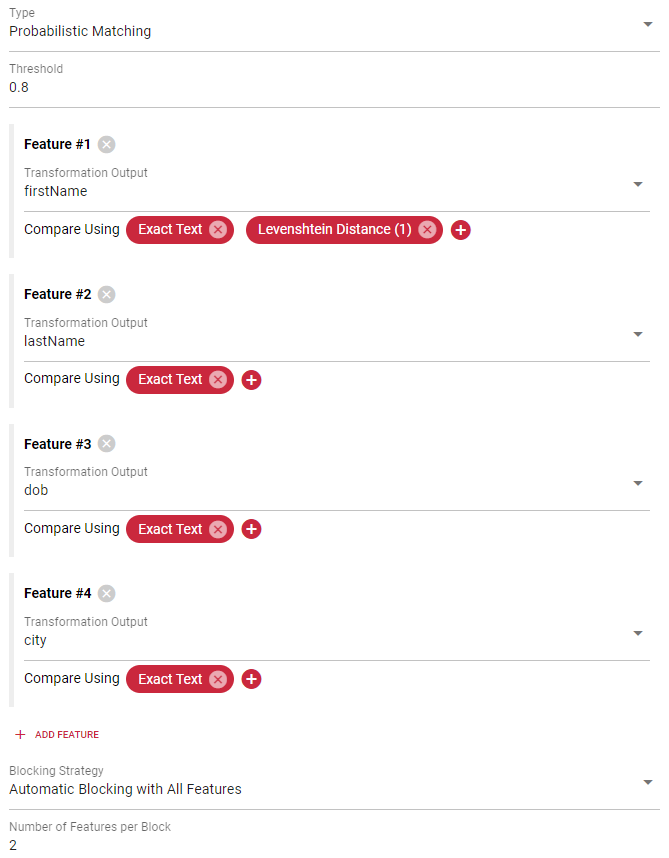
Probabilistic matching requires a good blocking strategy. Blocking prevents long
model training times by clustering the data into blocks. Instead of comparing
each record with all other records, it will only compare each record from that
block with all other records from the same block. By default Tilores automatically
creates blocks that are small enough for a good training and model performance.
Depending on the features, it might be necessary to take over control of the
blocking.
### Automatic Blocking with All Features
This is the default strategy. It works by clustering the data of `n` features
into the same block. This works well for cases where all features have a high
cardinality/uniqueness (e.g. names, addresses, etc.). If low cardinality
features (e.g. gender, title, etc.) are available, then this may cause a few
large blocks.
### Automatic Blocking with Selected Features
This blocking strategy works the same way as the previous one, except that it is
possible to explicitly exclude low cardinality features for blocking. It will
still use these features for training, but without the unintended effects for
selecting potentially matching record pairs.
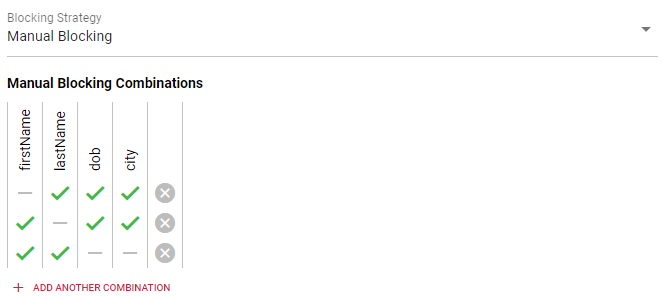
### Manual Blocking
This blocking strategy allows you to select the features that you want to
combine for blocking. While automatic blocking always creates blocks with `n`
features, you can choose any possible feature combination with manual blocking.
## Simple Text Equality
The simple text equality matcher is satisfied if the provided transformation
output has the exact same text value for two records.
By default matching happens only if both values contain a non-empty value.
Disabling the must exist option will also allow matches if both values are empty.
#### Examples
| Text 1 | Text 2 | Matches |
| ---------- | ---------- | ------- |
| John Smith | John Smith | true |
| John Smith | Smith John | false |
## Temporal Distance
The temporal distance matches if two timestamps are within the given time frame.
The temporal distance option is a text of decimal numbers, each with a unit
suffix such as "24h" or "2h30m15s". Valid units are "h" (hour), "m" (minute) and
"s" (second).
The value for the transformation output must be a valid timestamp in the
[RFC3339Nano format](https://datatracker.ietf.org/doc/html/rfc3339). Other
time formats might be supported, but there is no guarantee.
#### Examples
* Temporal Distance: 24h
| Time 1 | Time 2 | Matches |
| -------------------- | -------------------- | ------- |
| 2023-06-07T11:18:32Z | 2023-06-07T12:00:00Z | true |
| 2023-06-07T11:18:32Z | 2023-06-08T11:18:33Z | false |